
User reports (Reports ribbon)
The reports on the User reports menu is included in osFinancials5.
Users may add their own reports in the ...\plug_ins\reports\userreports folder.
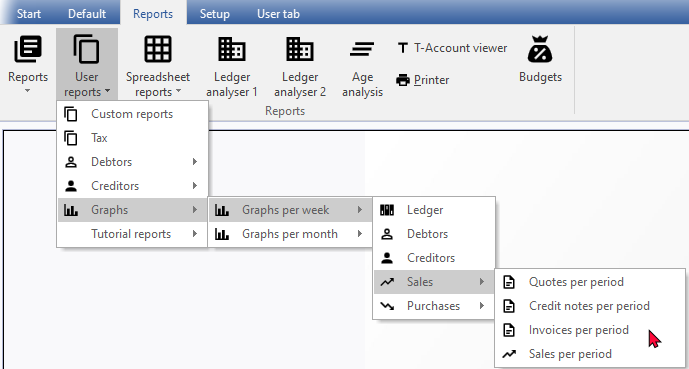
The following user reports is included in osFinancials5:
- Custom reports – This is custom sales and purchase reports.
- 2cred-sku-det - Lists the Purchase and Supplier return documents for a selected creditor (supplier).
- 2deb-sku-det - Lists the Invoice and Credit note documents for a selected debtor (customer / client).
- Tax - List the Tax type account codes and the tax rates which is added / edited in Setup → Accounts (Setup ribbon).
- Debtors -
- Age analysis - The Debtor age analysis ("Balances detail, Balances detail (open item)" and "Balances") reports allows you to analyse the outstanding amounts your debtors (customers / clients) owes you in specified periods such as total, 30, 60 and 90 days, or more. These reports are essential for cash flow control. You may also wish to use this facility for credit control, to send reminders to your debtors (customers / clients), to optimise your cash flow management.
- Outstanding - “Due date” and “Debtors outstanding at date” reports. These reports will list all the transactions before and on a selected period (date). It will list the details for each transaction (i.e. Reference No., Date, Due date, Debit, Credit and the accumulative balance for each of the debtor (customer / client) account.
- Creditors -
- Age analysis - The Creditor age analysis ("Balances detail, Balances detail (open item)" and "Balances") reports allows you to analyse the outstanding amounts you owe to your creditors (suppliers) in specified periods such as total, 30, 60 and 90 days, or more. These reports are essential for cash flow control. You may also wish to use this facility to schedule the payments to your creditors, to optimise your cash flow management.
- Outstanding - “Due date” and “Creditors outstanding at date” reports. These reports will list all the transactions before and on a selected period (date). It will list the details for each transaction (i.e. Reference No., Date, Due date, Debit, Credit and the accumulative balance for each of the creditor (supplier) account.
- Graphs -
- Graphs per week -
- Ledger - The "Graph - Profit / Loss per week" displays the Net Profit / Loss per week in a bar chart.
- Debtors - The “Graph - Debtors per week” displays the debit and credit transaction totals of all debtor (customer / client) accounts per week in a bar chart.
- Creditors - The “Graph - Creditors per week” displays the debit and credit transaction totals of all creditor (supplier) accounts per week in a bar chart.
- Sales -
- Quotes per week - Quantities and Quotes per week - Amount
- Credit notes per week - Quantities and Credit notes per week - Amount
- Invoices per week - Quantities and Invoices per week - Amount
- Sales per week - Invoices minus Credit notes - Quantities and Invoices minus Credit notes - Amount
- Purchases -
- Orders per week - Quantities and Orders per week – Amount
- Purchases per week – Purchases minus Supplier returns - Quantities and Purchases minus Supplier returns per week - Amount
- Supplier returns per week - Quantities and Supplier returns per week – Amount
- Purchases per week - Quantities and Purchases per week - Amount
- Graphs per month -
- Ledger - The "Graph - Profit / Loss per month" displays the Net Profit / Loss per week in a bar chart.
- Debtors - The “Graph - Debtors per month” displays the debit and credit transaction totals of all debtor (customer / client) accounts per week in a bar chart.
- Creditors - The “Graph - Creditors per month” displays the debit and credit transaction totals of all creditor (supplier) accounts per week in a bar chart.
- Sales -
- Quotes per month - Quantities and Quotes per month - Amount
- Credit notes per month - Quantities and Credit notes per month - Amount
- Invoices per month - Quantities and Invoices per month - Amount
- Sales per month - Invoices minus Credit notes - Quantities and Invoices minus Credit notes - Amount
- Purchases -
- Orders per month - Quantities and Orders per month – Amount
- Purchases per month - Quantities and Purchases per month - Amount
- Supplier returns per month - Quantities and Supplier returns per month – Amount
- Purchases per month – Purchases minus Supplier returns - Quantities and Purchases minus Supplier returns per month - Amount
- Tutorial reports - These are basic guidelines to create and edit reports with Reportman. This is some basics to create debtor listing and creditor listing reports with Reportman.