Debtors - Outstanding - Outstanding at date
Debtors outstanding at date - This report is similar than the Due date report. It will not list the Due date column in the transactions details column.
If a debtor (customer / client) account is set as Open item account on the Accounting information tab),it will list only those transactions with outstanding amounts. Any credit amounts, which are not linked to debit transactions, should be processed in the Open item link (Default ribbon).
|
|
This report only includes batch and document transactions which are posted. Unposted batches and documents will be NOT be included in this report. To view a list of unposted batches and documents, which is not updated to the ledger, go to Input → Checking unposted items (Default ribbon). |

Debtors outstanding at date report options
To print Debtors outstanding at date reports:
- On the Reports ribbon, select User reports → Debtors → Outstanding.
- Select "Debtors outstanding at date" report.
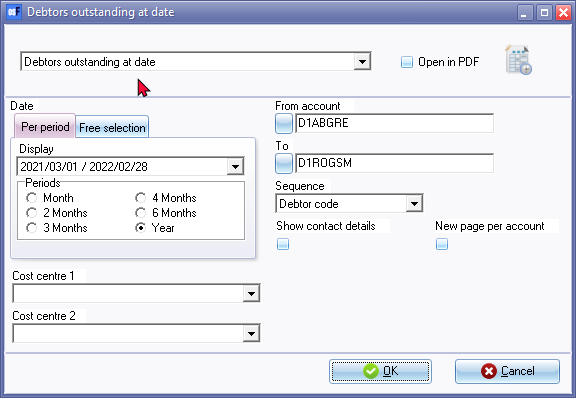
- Select the following options:
- Period - Select a period on the Per period tab. You may click on the Free selection tab to select a specific date or a range of dates to include transactions in the report. All the transactions which are outstanding on or before the end date of the periods will be listed.
- From account ...To account - Select a debtor (customer / client) account or a range of debtor (customer / client) accounts, to include in the report.
- Sequence - Select "Debtor code" to print the report by account code or "Description" to print the report by account description (name).
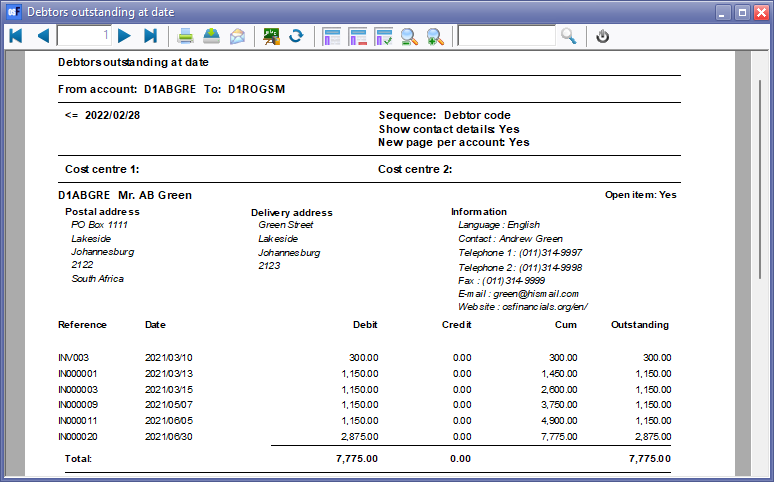
- Show contact details - If this option is not selected (not ticked), it will list only the transactions. Tick this option to include the details (i.e. postal address, delivery address, and contact details).
- New page per account - If this option is selected (ticked), it will print the transactions for each account on a new page.
|
|
The Company details will not be printed as in the Page header. The company name is displayed in the Page footer. |

- Cost centre 1 / 2 - If you have activated Cost centres, you may select the Cost centres.
- Click on the OK button.
Printed : Debtors outstanding at date report
View the "Debtors outstanding at date" report:
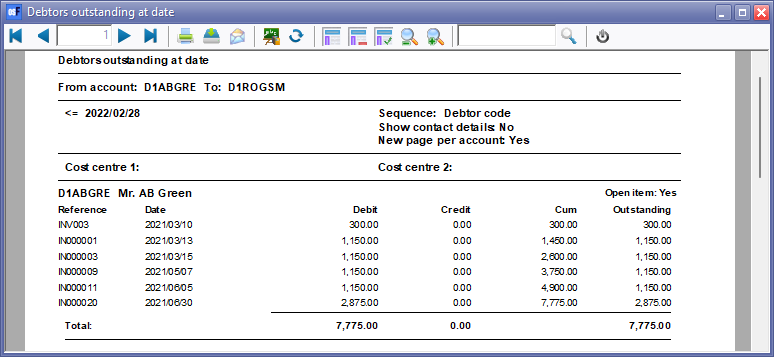
Printed : Debtors outstanding at date (Show contact details) report
View the "Debtors outstanding at date" ("Show contact details" option) report: