
Working with Reportman
A host of powerful components, functions and features in the Report designer is integrated and customised in osFinancials5. All reports and document layout files included in your osFinancials5 installation is designed in the Report manager designer. These reports, and document layout files is built on the Firebird database type. It should also support MSSQL,, MySQL and Postgress database types.
These reports, document layout files is integrated and grouped, in a file structure, included in various folders within the "... \plug_ins\reports\ " directory of your osFinancials5 installation. The most commonly used reports, is as follows:
- Document layout files - ...\plug_ins\reports\DOCUMENTS\DOCUMENTS - These include document layout files which may be selected to print the various sales documents (Invoices, POS Invoices, Credit notes, Quotes and Delivery notes) as well as purchase documents (Purchases, Supplier returns and Orders).
- Reports menu - ... \plug_ins\reports\systemreports - All standard reports needed to manage your Ledger, Debtors, Creditors, Stock items, Documents, Sales, Sales analysis, Purchases, Purchase analysis, etc. is grouped into folders and sub folders.
- User reports menu -... \plug_ins\reports\userreports - Some reports are included in your osFinancials installation. When you create or custom your own reports, you need to add them in the "userreports" folder. You may then access and print your own reports from the User reports structure.
- Ledger analyser - ... \plug_ins\reports\GENERAL\ledgerview - All report types to print the Trial balance, Income statement, Balance sheet, Standard column balances, This year vs last year, Budget vs actual, Budget listing and the transactions in the T-Account viewer. In addition to this, these reports may be exported and opened in your favourite spreadsheet application.
- Spreadsheet reports - stored in the "... \plug_ins\reports\excelreports" folder. These reports will open in the integrated spreadsheet component in osFinancials5.
Different tables in osFinancials must be used for a report. The most commonly used tables and its relationships will be outline in this document.
Value have been added to the connections, interaction, relationship to force and interact responses with the datasets and database connections as a plugin / extensions from osFinancials5 to Reportman. The Zeos Database Objects connection will basically always render a message (i.e. “Test connection passed” ). This is the leader Opensource database driver technology for Delphi/Kylix/Builder.
|
|
In addition to the Reportman topics, in this documentation, a set of offline documentation is stored in the " ...\plug_ins\reportman\doc " folder of your osFinancials5 installation directory. You may launch the index.html file (... / plug_ins/reportman/doc/index.html) in your web browser. The official online documentation of the Report Manager is available at https://reportman.sourceforge.io/ . |

Should you fail with this successful connection, it may imply that one of the following may need attention:
- Installation of osFinancials5 (Did not install the Firebird database engine), only installed the Single user Embedded version).
|
|
After installing osFinancials5, the following optional additional components, is included in the “installs” folder of the osFinancials5 root installation directory:
|


- May have more than one Alias in the reportman (*.rep) files – lets call it badly designed reports or document layout files.
- Corrupted data in the database, etc.
- The data in the database, for example; date format, currency, time, etc., is system locale (Regional and Language) specific.
|
|
If osFinancials5 have been installed on a Windows machine, the Language and Regional settings may be changed if you click on the Set the Windows date/format/style button located in Setup → Company info - Options or on the DateTime settings button located on the Setup → System parameters (Setup ribbon). In Windows operating you may change this in the Control Panel (Regional and Language settings). This will for example display the correct date format as per your countries' regional settings on all reports output and screens in osFinancials5. |

|
|
To develop or edit reports in osFinancials5, you need to use the built in Reportman in osFinancials5. Some extra functions have been added to Reportman in osFinancials5. Some of these extra functions are; 'GETTEXTLANG' , 'RETURNSQL' , 'NUMBERTOWORDS' , 'GETPRICE', etc. Another important feature is Data access configuration. |
All reports in osFinancials5 are fully translatable via the 'GETTEXTLANG' function. Basically all document layout files and reports designed in Reportman can be displayed in any of the languages by changing the Language in the Switch language (Start ribbon) option.
Language files may be edited in Tools → Customise language (Setup ribbon). These are stored in the ".../Bin/Languages" folder.
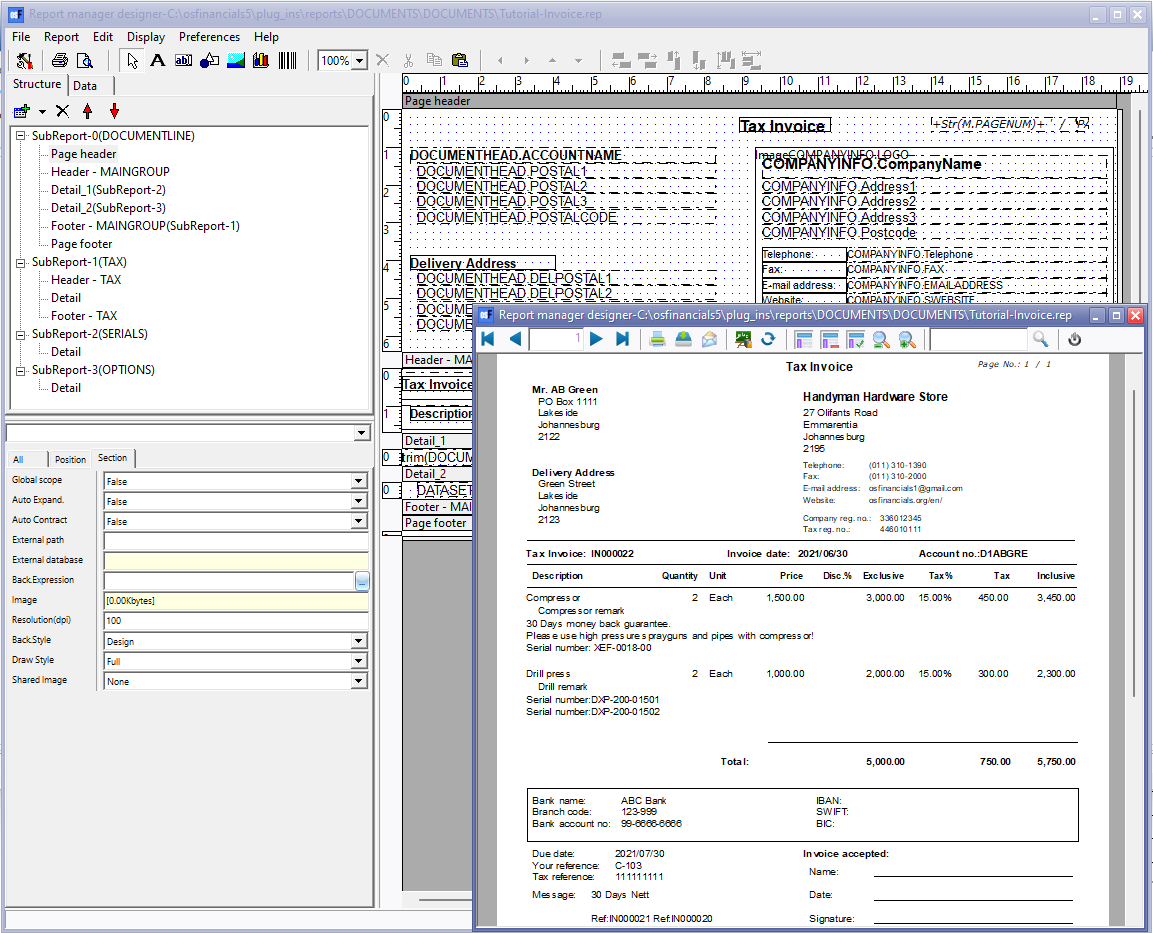
All objects are added to a selected page structure. In the example of the "Tutorial-Invoice.rep". On the Page header we have a number of expressions (from the COMPANYINFO and the DOCUMENTHEAD datasets), an image (company logo) (from the COMPANYINFO dataset) and some labels (static text), e.g. Telephone, Fax and E-mail Address.
If you click on a selected object on the list, the object will be displayed on the grid. You may then easily edit move resize or set the properties for the object.
|
|
Should you receive an error printing and previewing the report, note the name and number of the object (expression, etc.). It will make it easier to locate the expression and to fix the error when you are editing the report in the Repost designer. |
