
Nuut tot rekeningkunde
Books
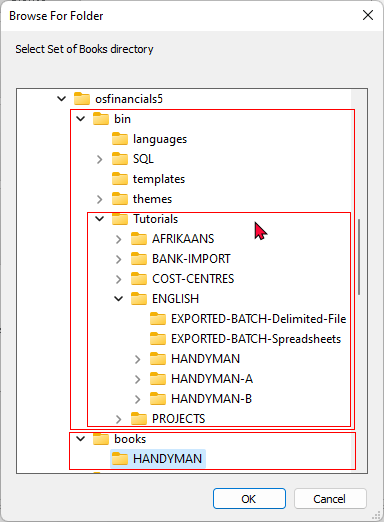
Die HANDYMAN Stel Boeke sal in die "books" leêrgids geinstalleer word.
Handleidings
Die handleidings vir Stelle Boeke, sal in die "...bin / Tutorials"-gids geïnstalleer word. Om hierdie handleidings te volg, moet jy op die Rondsoek-ikoon (van die Stel Boeke-skerm) klik en die Stel Boeke kies en oopmaak.
AFRIKAANS
Die volgende Stel Boeke gebaseer op die Afrikaanse handleidings, is in die “…\bin\Tutorials\AFRIKAANS\”-lêergids geïnstalleer:
- NUTSMAN (Geen transaksies).
- NUTSMAN-A (Ongeposteerde transaksies)
- NUTSMAN-B (Gegeposteerde transaksies).
ENGLISH
English tutorials (using the default payments and receipt batches for banking / cash transactions):
The following Set of Books based on this tutorial, is installed in the “…\bin\Tutorials\ENGLISH\” folder:
- HANDYMAN (No transactions)
- HANDYMAN-A (Unposted)
- HANDYMAN-B (Posted)
|
|
The following folders contains files which may be imported into batches:
|

BANK-IMPORT Plugin - English tutorials
English tutorials (using the BankImport plugin for banking / cash transactions):
The following Set of Books based on this tutorial, is installed in the “…\bin\Tutorials\BANK-IMPORT\” folder:
- HANDY-BANK (No transactions).
- HANDY-BANK-A (Unposted transactions in batches and documents, except the Payments and Receipt batches, which is cleared for the Bank account and the Petty cash).
- HANDY-BANK-B (Posted transactions in batches and documents, including the imported bank statement and processed Petty cash transactions).
- HANDY-BANK-UNPOSTED-BANK-STATEMENT – All transactions in batches and documents have been posted. The sample Bank statement in the “…\bin\Tutorials\BANK-IMPORT\BANK-STATEMENTS” folder needs to be imported and Petty cash transactions needs to be processed).
COST-CENTRES
Tutorials / examples to explore the activation, processing and reporting of Cost centres in osFinancials5. See - Cost centres in this Help file.
The following Set of Books based on this tutorial, is installed in the “…\bin\Tutorials\COST-CENTRES\” folder:
- COST-CENTRES-A (transactions and documents not posted to the ledger)
- COST-CENTRES-B (transactions and documents posted to the ledger).
PROJECTS
Tutorials / examples to explore the activation, processing and reporting of Projects in osFinancials5. See - Projects in this Help file.
The following Set of Books based on this tutorial, is installed in the “…\bin\Tutorials\PROJECTS\” folder:
- PROJECTS-A (transactions and documents not posted to the ledger)
- PROJECTS-B (transactions and documents posted to the ledger).