
Open item - Creditors
In the case of creditor (supplier / vendor) accounts, credit transactions are processed in the purchase batch or purchase documents (document entry).
Once these credit transactions is updated (posted) to the ledger, and debit transactions are processed in the payments batch, or supplier returns in document entry) these debit transactions may be linked to the credit transactions.
Once these credit transactions is linked to a debit transaction, only the outstanding transactions (unlinked) outstanding transactions should be listed.
|
|
If all the transactions are not linked, it will be indicated on the Totals tab in a red or orange colour. This will help you to identify those accounts which may need open item processing.
|

|
|
It is important to check that all batches and documents are updated to the ledger and that all transactions are linked, before sending out creditor remittance advises. The Unposted batches tab of Open item link will only display the linked transactions which is already linked but not yet posted (updated) to the ledger. There may also be unposted documents and batches, which need to be linked, once these transactions and documents are posted (updated) to the ledger. To view these, select in Input → Checking for unposted items on the Default ribbon). |

Open item / Ageing reports for creditor (supplier / vendor) accounts
In addition to the Age analysis icon on the Reports ribbon; or the Due tab of Open item link icon on the Default ribbon; the following reports is available to manage open item creditor (supplier / vendor) accounts:
Reports menu
Transaction reports -
- Transaction list - Open item - This report lists only those outstanding transactions in documents and batches which are posted (updated) to the ledger. It will list only those transactions with outstanding amounts. Any debit amounts, which are not linked to credit transactions, should be processed in Open item link (Default ribbon).
- Transaction list - This report lists all the transactions in documents and batches which are posted (updated) to the ledger. All transactions will be listed irrespective of open item links.
Remittance advices -
- Creditor remittance advises - The remittance advice will print all transactions. It does not use the "Open item" feature.
- Creditor remittance advises - Outstanding - The remittance advice will print only the transactions with outstanding amounts.
User reports menu
Age analysis reports -
- Age analysis - Balances detail - Displays the reference, date, amount and description for each transaction. The Total outstanding as at the Date of ageing is split to the number of days specified in up to 3 periods.
- Age analysis - Balances detail (open item) - This is similar to the "Balances detail" report, but it displays the outstanding amount and TransactionID.
- Age analysis - Balances - This is a similar report as the "Balances detail" report. It will only list the balances for each ageing period.
Open item processing - Selected creditor (supplier / vendor) accounts
|
|
Documents list screen - context menu - Others → Open item link option. On Default ribbon, select Documents (Documents list screen), select the Document type, e.g. Purchase, Supplier return or Orders. Right-click on a selected document. On the context menu, select the Others → Open item link option. This will launch the "Open item link" form for the creditor (supplier / vendor) account; associated with the selected document. |
To launch the Open item link screen for a creditor (supplier / vendor) account:
- Go to Open item link (Default ribbon).
- On the list of accounts in the Totals or the Transactions tab, select the creditor (supplier / vendor) account and double-click.
- The "Open item link" screen for a selected creditor (supplier / vendor) account is launched.
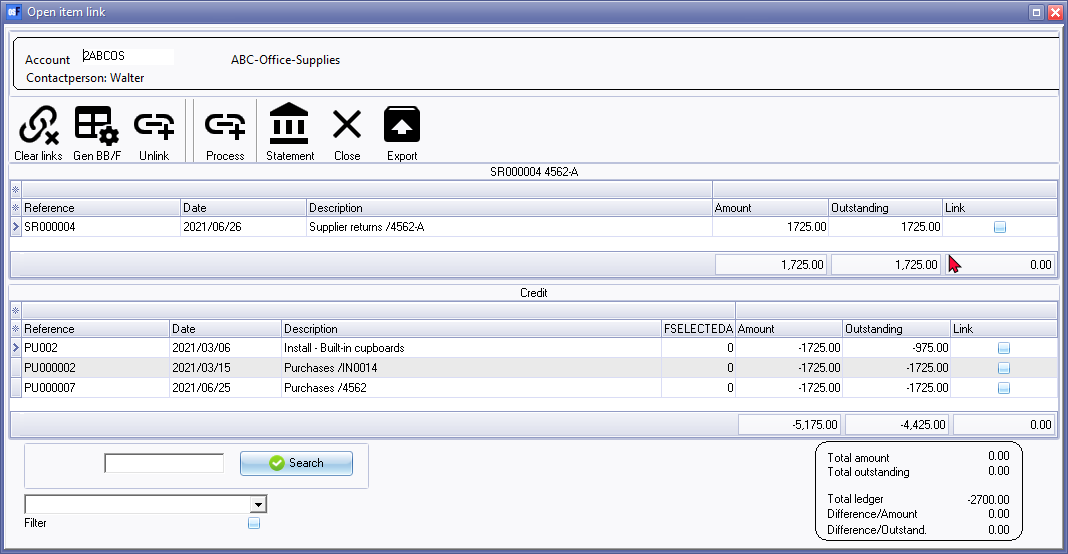
- All the outstanding transactions, which are not linked (matched), while processing transactions in batches and documents, will be listed. Once all transactions for an open item creditor (supplier / vendor) account, is correctly linked and processed, there should be no transactions in the "Debit" section of the screen:
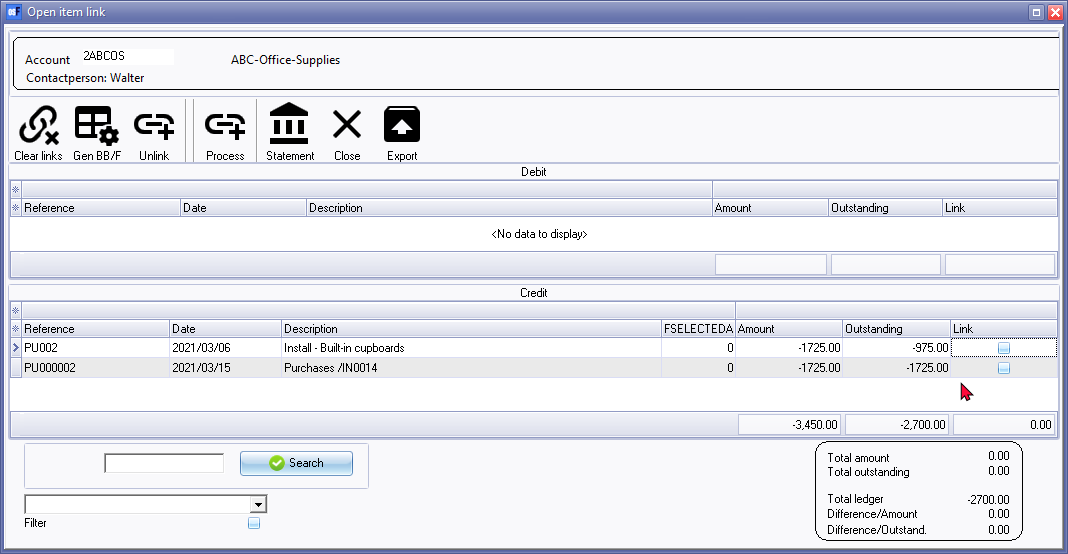
|
|
Transactions tab - This list the posted transactions similar to the "Open item link" screen.
|
|
|
Open item - processing options and filter options |
