
Reports - excelreports - Spreadsheet reports menu file names
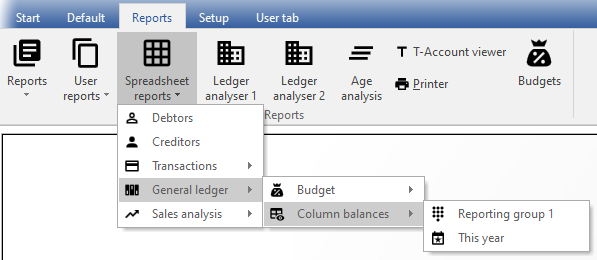
Spreadsheet reports menu
|
|
Spreadsheet reports osFinancials and the power of Spreadsheets - Spreadsheet sales (Default ribbon). - Spreadsheet reports (Reports ribbon).
|


These spreadsheet reports are stored in the “...\plug_ins\reports\excelreports” folder of your installation directory.
Selected reports will be opened in the powerful spreadsheet feature in osFinancials5.
When printing reports using the “Material” theme, the icons in the “Material” theme folder will be displayed in menus and the icons in the “Classic” theme folder will be displayed on the report parameters screens and in "Report man".
Spreadsheet reports menu - File structure and file names

|
|
These Spreadsheet reports cannot be edited, previewed and opened in the Report designer or from the "Report man" screen. |

For your convenience, a list of the file names and structure of the reports in the Spreadsheet reports menu (Reports ribbon) is as follows:
|
Menu item |
Sub-menu item 1 |
Sub-menu item 2 |
Internal file name |
Classic theme |
Material theme |
|
|
|
TRN_160 |
|
|
|
|
|
|
TRN_161 |
|
|
|
|
|
|
TRN_20069 |
|
|
|
|
|
Per period |
|
TRN_3314 |
|
|
|
General ledger |
|
|
TRN_32 |
|
|
|
|
Budget |
|
TRN_1027 |
|
|
|
|
|
TRN_603 |
|
|
|
|
|
|
TRN_1323 |
|
|
|
|
|
Column balances |
|
TRN_3106 |
|
|
|
|
|
TRN_603 |
|
|
|
|
|
|
TRN_1323 |
|
|
|
|
Sales analysis |
|
|
TRN_85 |
|
|
|
|
|
TRN_906038 |
|
|
|
|
|
|
TRN_906122 |
|
|


