
Spreadsheet - Import - Debtors / Creditor accounts
This option will allow you to import creditor (supplier / vendor) accounts from a valid an Excel spreadsheet in the Excel Workbook (xlsx) file format. You may then add new creditor (supplier / vendor) accounts, edit existing creditor (supplier / vendor) accounts and import it back into your Set of Books.
To export debtor (customer / client) and / or creditor (supplier / vendor) accounts to a Excel Workbook (xlsx) file:
- Open the Set of Books in which, you wish to import debtor (customer / client) accounts and creditor (supplier / vendor) accounts from a valid a spreadsheet export file.
- On the Setup ribbon, select Import.
- Select "Debtors/Creditors" as the "Data type to import".
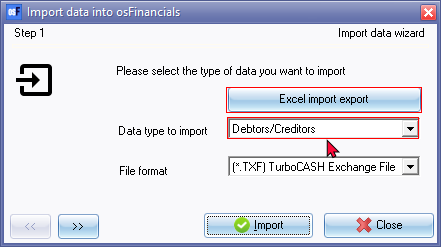
- Click on the Excel import export button. The Excel spreadsheet will be displayed with the column headings (database table) for the debtor (customer / client) accounts and creditor (supplier / vendor) accounts (without any data).
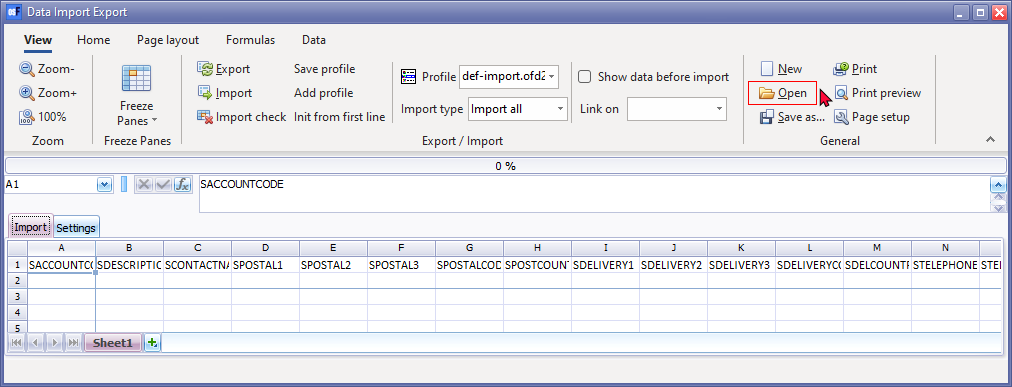
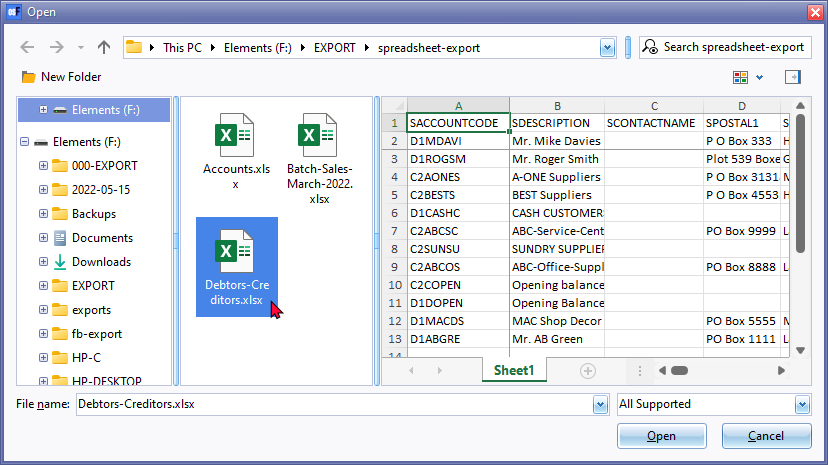
- On the "Data Import Export" screen, click on the Open icon to select a valid Excel Workbook (*.xlsx) file.
|
|
You may click on the "Show preview pane" icon on the "Open" screen to display a preview of the selected file to open (import) in the "Data Import Export" screen.. |

- The data of the debtor (customer / client) accounts and creditor (supplier / vendor) accounts included in the valid Excel Workbook (xlsx) file, will be imported (populated) into the spreadsheet ("Data Import Export" screen).

- Click on the Import icon.
|
|
Optional - Show data before import setting The "ImportCheck" screen (if the Import the "Show data before import" option was selected (ticked) on the "Data Import Export" spreadsheet screen) is displayed:
Click on the All or OK buttons to start the import process. |


- Once the import process is finalised, Column A will be in a green background colour.
- Close the "Data Import Export" spreadsheet screen.
- You may go to Debtors (Default ribbon) to view and / or edit the imported debtor (customer / client) accounts. You may go to Creditors (Default ribbon) to view and / or edit the imported creditor (supplier / vendor) accounts.