
Spreadsheet - Export - Debtors / Creditor accounts
This option will allow you to Export your debtor (customer / client) accounts and creditor (supplier / vendor) accounts into an Excel spreadsheet. You may then add new debtor (customer / client) accounts, edit existing debtor (customer / client) accounts and import it back into your stock code file.
|
|
The debtor (customer / client) accounts are maintained in Debtors (Default ribbon). The creditor (supplier / vendor) accounts are maintained in Creditors (Default ribbon). |

To export debtor (customer / client) and creditor (supplier / vendor) accounts to a Excel Workbook (xlsx) file:
- On the Setup ribbon, select Import.
- Select "Debtors/Creditors".
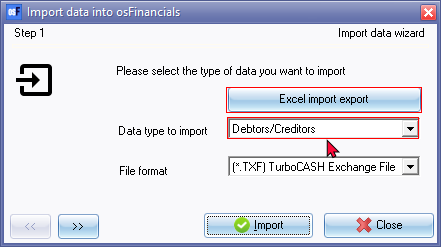
- Click on the Excel import export button. The Excel spreadsheet will be displayed with the column headings (database table) for the debtor (customer / client) accounts and creditor (supplier / vendor) accounts (without any data).

- Click on the Export icon. The data from your debtor (customer / client) accounts and creditor (supplier / vendor) accounts will be imported (populated) into the spreadsheet.

- You may add new accounts, edit the accounts, change the addresses, credit limits, charge amounts, etc., whatever field, is necessary.
- Click on the Save as... icon (View ribbon) to save the data in the "Data Import Export" spreadsheet as an "Excel Workbook (*.xlsx)" file.

- Select the folder and enter a name for the file.
- Click on the Save button.
- Click on the Close icon in the titlebar of the "Data Import Export" screen.
Spreadsheet columns
The data of the debtor (customer / client) accounts and creditor (supplier / vendor) accounts are imported (populated) in forty-six (46) columns in the spreadsheet, and is as follows:
|
|
|
Field name |
Values |
Comments |
|
|
A |
SACCOUNTCODE |
Account code prefixed by account type: C = Creditors D = Debtors |
When creating creditor or debtor accounts, the code should start (prefixed). Another example is : 1 = Debtors 2 = Creditors |
|
|
B |
SDESCRIPTION |
Alpha-numeric |
Name or description of debtor / creditor account |
|
|
C |
SCONTACTNAME |
Alpha-numeric |
Name or description of contact |
|
|
D |
SPOSTAL1 |
Alpha-numeric |
Postal address 1 |
|
|
E |
SPOSTAL2 |
Alpha-numeric |
Postal address 2 |
|
|
F |
SPOSTAL3 |
Alpha-numeric |
Postal address 3 |
|
|
G |
SPOSTALCODE |
Alpha-numeric |
Postal code / Zip code |
|
|
H |
SPOSTCOUNTRY |
Alpha-numeric |
Country |
|
|
I |
SDELIVERY1 |
Alpha-numeric |
Delivery address 1 |
|
|
J |
SDELIVERY2 |
Alpha-numeric |
Delivery address 2 |
|
|
K |
SDELIVERY3 |
Alpha-numeric |
Delivery address 3 |
|
|
L |
SDELIVERYCODE |
Alpha-numeric |
Delivery code / zip code |
|
|
M |
SDELCOUNTRY |
Alpha-numeric |
Country |
|
|
N |
STELEPHONE1 |
Alpha-numeric |
Telephone 1 |
|
|
O |
STELEPHONE2 |
Alpha-numeric |
Telephone 2 |
|
|
P |
SEMAIL |
Alpha-numeric |
E-mail address |
|
|
Q |
SFAX |
Alpha-numeric |
Fax number |
|
|
R |
FCREDITLIMIT |
Numeric |
Credit limit |
|
|
S |
FCHARGEAMOUNT |
Numeric |
Charge amount (Generate multiple transactions) in Batches. |
|
|
T |
FDISCOUNT |
Numeric |
Discount percentage - Only applicable to Debtor accounts |
|
|
U |
FINTEREST |
Numeric |
Percentage - Only applicable to Debtor accounts |
|
|
V |
BOPENITEM |
0 = Not set as open item 1 = Open item account |
|
|
|
W |
BINACTIVE |
0 = Active 1 = Disabled (inactive) |
|
|
|
X |
SMESSAGE |
Alpha-numeric |
Statement message for debtors Remittance message for creditors |
|
|
Y |
WDEFAULTPRICETYPEID |
Numeric |
ID of Selling price 1 / 2 / 3 selected for debtor accounts |
|
|
Z |
DLASTACTIVITY |
Date |
|
|
|
AA |
SREFERENCE |
Alpha-numeric |
|
|
|
AB |
SBANKNAME |
Alpha-numeric |
|
|
|
AC |
SBRANCHCODE |
Alpha-numeric |
|
|
|
AD |
SBANKACCOUNTNUMBER |
Alpha-numeric |
|
|
|
AE |
SBANKACCOUNTNAME |
Alpha-numeric |
|
|
|
AF |
SCREDITCARDNUMBER |
Alpha-numeric |
|
|
|
AG |
SCREDITCARDTYPE |
Alpha-numeric |
|
|
|
AH |
SCREDITCARDHOLDER |
Alpha-numeric |
|
|
|
AI |
WDUEDAYS |
Numeric |
Number of days used for ageing and due date |
|
|
AJ |
SCOMPANYREGNO |
Alpha-numeric |
|
|
|
AK |
SFREEFIELD1 |
Alpha-numeric |
Statement message for debtors line 1 |
|
|
AL |
SFREEFIELD2 |
Alpha-numeric |
|
|
|
AM |
SFREEFIELD3 |
Alpha-numeric |
|
|
|
AN |
SGROUP1 |
Alpha-numeric |
Debtor / Creditor Reporting group 1 |
|
|
AO |
SGROUP2 |
Alpha-numeric |
Debtor / Creditor Reporting group 2 |
|
|
AP |
SSALESPERSON |
Alpha-numeric |
Name of Salesperson (only applicable to debtor accounts) |
|
|
AQ |
SCURRENCY |
|
|
|
|
AR |
SFOREEXACCOUNT |
|
|
|
|
AS |
SDEFAULTACCOUNT |
|
Ledger account code (selected) |
|
|
AT |
SDEFAULTTAX |
|
Tax account code (selected) |
