
Calendar (Reports menu)
The "Calendar - Hours" report allows you to print the categories of events (i.e. Appointments, Debtor Appointments, Creditor Appointments and Hours) scheduled in the Calendar (Planner).
|
|
Multi-User calendar (agenda) - Manual - Shop - Once-off license - This plugin adds the multi-user agenda (multiple agendas) to the Calendar (Planner). You can add agendas and link them as default to the current user. For every agenda a tab will appear in the agenda Calendar so you can see what the appointments, etc. are on other agendas. You can have a agenda for each employee, salesperson, user, etc. and create invoices directly from his / her agenda with a simple click. Each agenda has it's own calendar and task list. |

Calendar - Hours report options
To print Calendar - Hours reports:
- On the Reports ribbon, select Reports → Calendar.
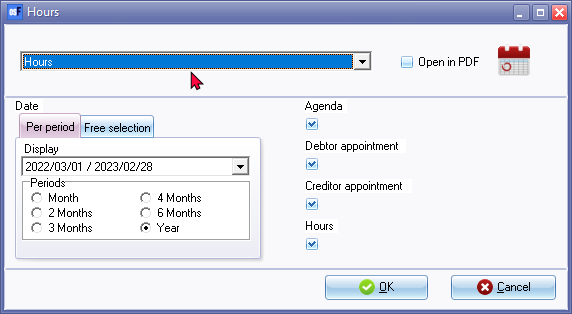
- Select the period on the Per period tab. You may click on the Free selection tab to select a specific date or a range of dates.
- Select the following options:
- Agenda - Select to include the general events (e.g. meetings, appointments, etc.).
- Debtor appointment - Select to include the appointments for debtor (customer / client) accounts. All appointments are also listed in the Appointments tab of the Debtor account.
- Creditor appointment - Select to include the appointments for creditor (supplier / vendor) accounts. All appointments are also listed in the Appointments tab of the Creditor account.
- Hours - Select to include the appointments for the hours event category. The are scheduled appointments for which quotes are generated and confirmed to invoices.
- Click on the OK button.
Printed : Calendar - Hours report
An example of the "Calendar - Hours" (all events) report, is as follows:

The colours for the events are as follows:
- Appointment (general - i.e. with bank manager, lunches, etc.)
- Repeating invoices - schedule when you need to copy / process repeating invoices.
- Debtors Appointment - schedule up to six (6) categories of appointments with debtors (customers / clients). You may also create invoices for these debtor appointments.
- Creditors Appointment - schedule appointments with creditors (suppliers).
- Hours - schedule the hours (time) to invoice debtors (customers / clients). Once these are set you may generate Quotes for the hours. Once these Quotes are generated, you may edit them (if necessary) and convert them to Invoices.
|
|
Bulk time entries - Bulk time entries added for selected debtors (customers / clients) will be printed on this report as hours. |

|
|
See video on Bulk time entries |

|
|
Repeating invoices are not included in this report. |
