
Batch entry - Context menu - Select from account open item list
You may select a debtor (customer / client) or creditor (supplier / vendor) account on the "Batch entry" screen (right-click on selected transaction) and select the "Select from account open item list" option. The "Open item selection" screen will list the unlinked transactions as well as transactions with outstanding amounts for the relevant debtor (customer / client) or creditor (supplier / vendor) account. You then choose to link this transaction to a specific outstanding transaction on this open item list.
To copy and paste Contra account, Date, Reference or Description from a transaction in a batch to another transaction:
To select a creditor account in a batch:
- Select a transaction in the batch.
- Right-click and select the Select from account open item list option on the context menu. The "Open item selection" screen is displayed:
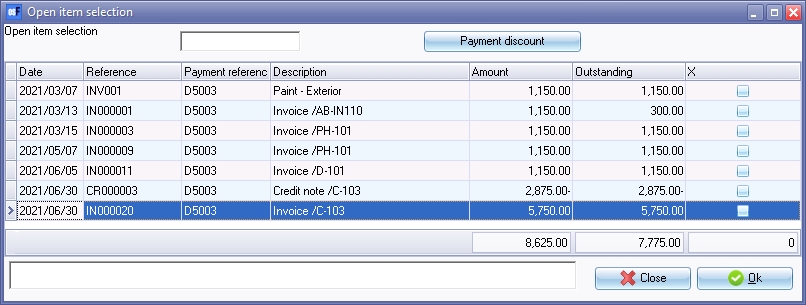
- Select the transaction(s) on the "Open item selection" screen.
- Add a tick in the "X" column to link.
- Click OK to link the transaction in the Batch to the selected transaction(s) in the "Open item selection" screen.