
Print documents in Debtor (customer / client) language
Print documents in debtor (customer / client) language
Set debtor (customer / client) language
To select / set / change a debtors (customers / clients) preferred language:
- Click on the Default ribbon, select Debtors; or press the F4 key.
- Select the debtor (customer / client) account and click on the Edit button; or double-click on a selected debtor (customer / client) account.
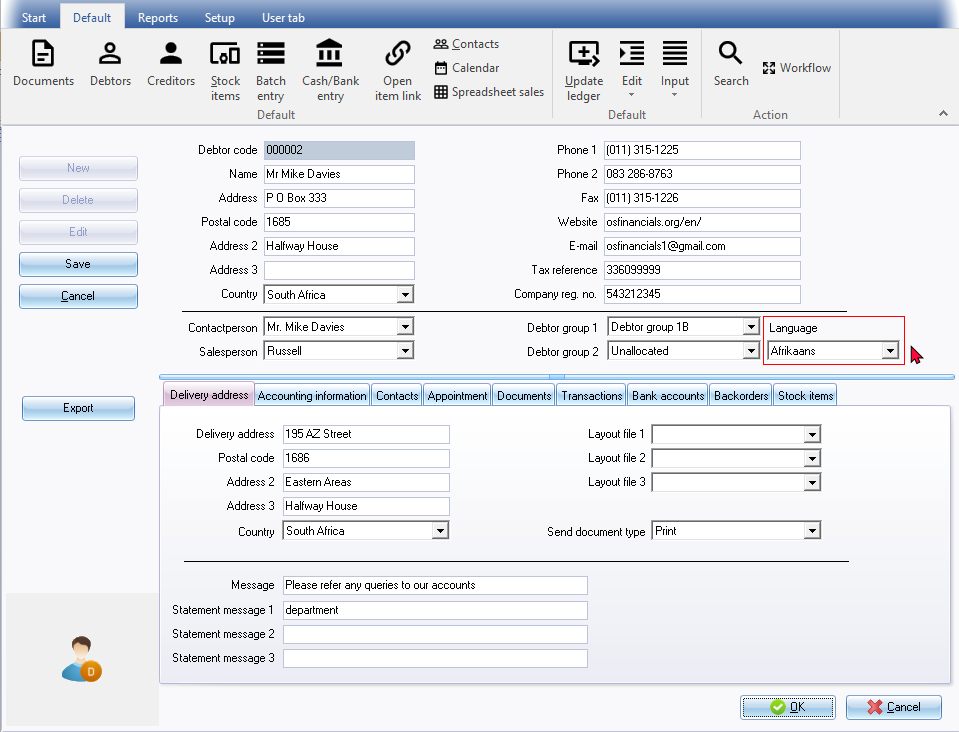
- Select the Debtor's Language.
- Click on the Save or OK button.
|
|
On the Delivery address tab Layout file 1 (Invoice), Layout file 2 (Credit note) and Layout file 3 (Quote) is empty for this this debtor customer / client) account. The layout files , selected on the "Layout file" field in the Setup → Documents setup on the Setup ribbon, for these document types, will be used for printing documents. If you have specific or your own custom layout files, you may select your own layout files. |

Layout files printed in debtor (customer / client) language:
|
|
See examples of translatable layout files. |

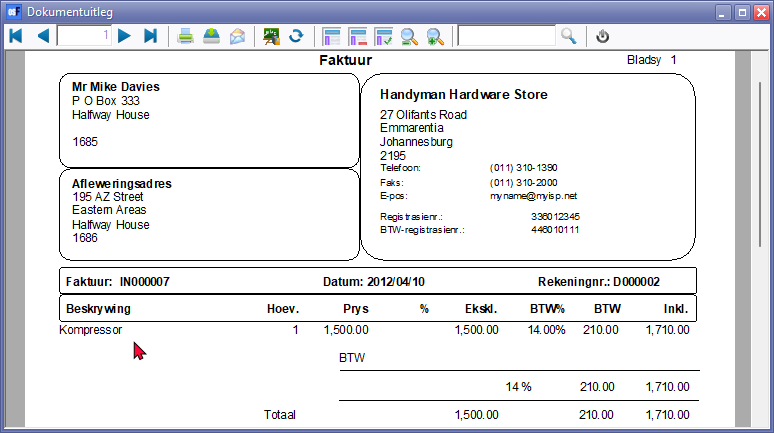
Example : Invoice - Afrikaans
|
|
The Description of the stock item, (i.e. "Kompressor") is a translation of Compressor as defined in the Languages tab of the Stock item. |