
Context menu - Others - Show details
By default, the details of each document is listed on the Documents list screen in columns. You may select to show the basic details of the items, quantities, remarks and comments added to documents. When a document is selected or the scrolled on the list, the details will be displayed.
|
|
The detail will be displayed regardless of whether you select other document types. The "Show detail" will only be disabled when you:
|

To show or hide the details on a selected document:
- On the Default ribbon, select Documents (Documents list screen), select the Document type, if the correct document type is not selected.
- Right-click anywhere on the Documents list screen or on a selected document. On the context menu, select the Others → Show details option.
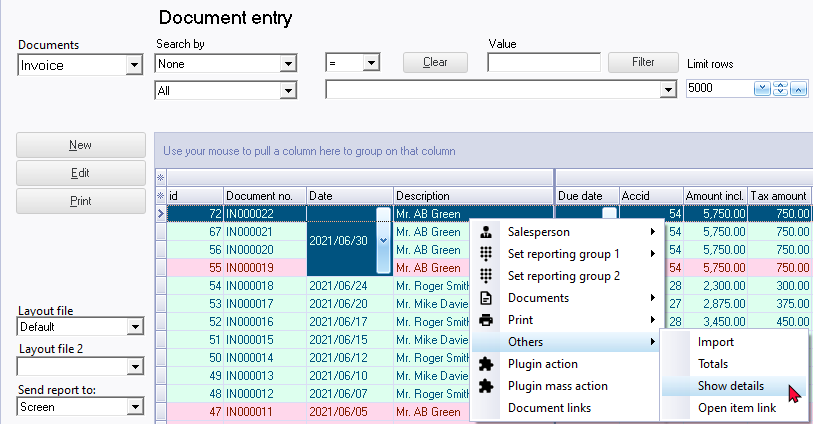
- When a document is selected, it will display the details of the document.
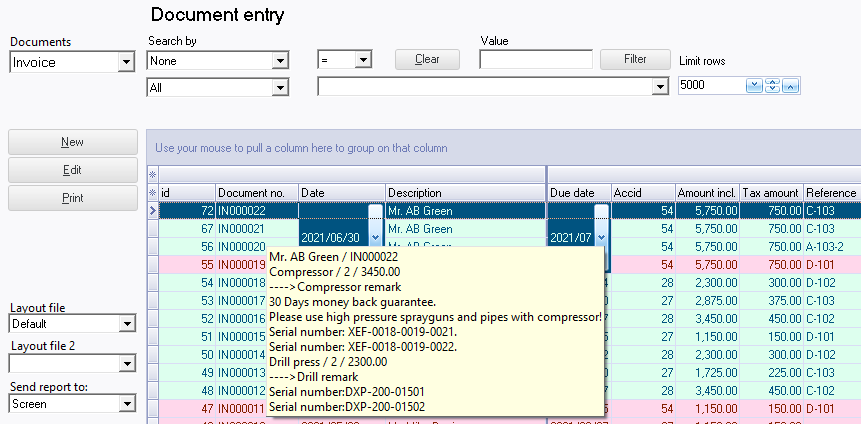
The details will display the following:
- Name of debtor (customer / client) or creditor (supplier / vendor)
- Document number
- Stock item description
- Quantity
- Price (Inclusive of tax)
- Remarks (if entered)
- Comments (if entered)
To turn the Show details off:
Right-click and select the Others → Hide option on the context menu.