
Activa plugin
|
|
Licence : - Manual - Shop - Once-off license - This plugin will help you with the depreciation of fixed assets in your accounts. Periodically you will receive a notification screen, which the depreciation shown. From this screen, the depreciation(s) can directly take place. |

Introduction to Activa plugin
The Activa plugin allows you to register Fixed assets that needs to be written-off. Fixed assets is written off over the life span of an asset. This write-off process may be spread over a number of financial years.
Once the Activa Fixed asset accounts is added in the Activa plugin setup, you will be reminded when new transactions is posted (updated to the ledger), or when Activa transactions need processing.
This will automate the management for the depreciation allowances of Fixed assets (Tangible assets) in a Set of Books over the life span of assets over a number of financial years.
Over the financial periods, the Depreciation expenses for a Financial year will be reported in the Income statement and will reduce your net profit.
It will also show the Net value of your Fixed assets (Fixed assets at cost minus the Accumulated depreciation) over the life span of the fixed asset in the Balance sheet.
|
|
If you have created new accounts for your assets in the, select Setup → Accounts (Setup ribbon), you need to launch the Activa setup screen and add the new asset accounts. Fixed assets is usually recorded as follows in the Trial balance as follows:
Depreciation expense account (Income statement) The total expense of depreciation transactions written-off in the selected financial period. Fixed assets accounts (Balance sheet) The Main account of the asset displays the net value of the asset. This is the cost price minus the accumulated depreciation of the asset during the life span of the asset. Thus is the NETT VALUE of the asset class. The Asset at cost price displays the purchase price and may include any additional cost incurred to make the asset useful for its purpose (e.g. installation costs). The Asset accumulated depreciation account displays the total amount written-off over the lifespan of the asset as at the specific date. This is the total of the depreciation transactions over the lifespan of the asset (which includes previous financial years. |

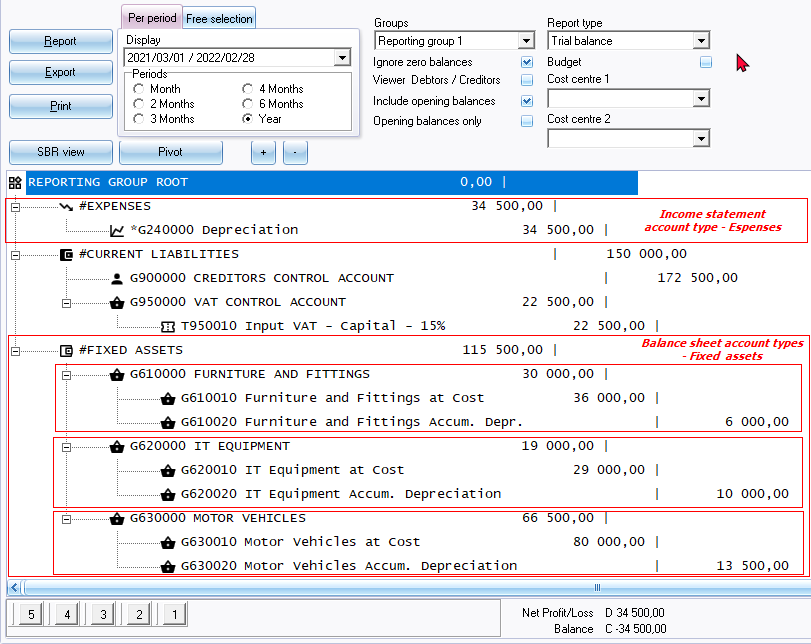
When a fixed asset reached the end of life end process that will clear of the total write-off from the balance write-off account and the initial asset account. This will display only the remaining total on the asset account and the contra account the will be cleared of this total.
Activa - Reports tab - Pivots tab Activa - Reports tab and Data tab allows you to filter and analyse your purchase, write-off and end of life transactions during the life span of fixed assets.
Processing Activa transactions
The process for the management of Activa transactions, is as follows:
- Link the Fixed asset accounts for each fixed asset.
- Add and link a Batch to process the write-off transactions.
- New transactions - All new transactions which is allocated to the Transactions - Fixed assets at cost account will be listed when purchase transactions in batches and purchase documents is posted (updated) to the ledger. You need to add the new transactions to the Activa - List tab.
- Add manual - You may also add Fixed assets manually.
|
|
Each time you Open the Set of Books, the Activa plugin will be launched, when:
|
- Specify the details of a fixed asset on the Activa - Details tab the write-off details. This is basically a once-off process for each fixed asset in which you need to specify the write-off method (percentage or amount) which will determine the number of years and calculations for the life span of the Fixed asset. This will schedule the next write-off date when transactions need processing.
- Process the depreciation transactions - On the Activa - List tab, you need to process the write-off transactions. This will calculate and update the depreciation, book value, and write-off amounts, etc., for the fixed asset.
- Activa - Reports tab - Pivots tab Activa - Reports tab and Data tab allows you to filter, view, sort and analyse your purchase, write-off and end of life transactions during the life span of fixed assets.